
Method X
 Members must complete the Intro to Filament 3D Printing Class before using this tool
MakerBot Method X 3D Printer

| Status | Active |
| Video Feed | None |
| Manufacturer | MakerBot/Ultimaker |
| Model | Method X |
| Nozzle Size | Various 0.25, 0.40mm |
| Nozzle Type | Unknown |
| Nozzle Count | 2 |
| Filament Size | 1.75mm |
| Print Volume | (Single extrusion) 190 x 190 x 196 (Dual extrusion) 152 x 190 x 196mm |
| Max Bed Temperature | 110C |
| Max Nozzle Temperature | 300C |
| Max Print Speed | Unknownmm/s |
| Extruder Type | Direct |
| Manual | [1] |
| Control Interface | Ultimaker Cura, Device Screen & Buttons |
| Network Address |
Safety
Universal Safety
- Be aware of your surroundings, especially when handling large materials.
- Do not approach anyone operating equipment. Stand patiently in their field of view.
Equipment-Specific Safety
Intro to Filament 3D Printing Class is required to use this tool.
Members must complete the Intro to Filament 3D Printing Class before using this tool
Safety
Universal Safety
- Be aware of your surroundings, especially when handling large materials.
- Do not approach anyone operating equipment. Stand patiently in their field of view.
Equipment-Specific Safety
Intro to Filament 3D Printing Class is required to use this tool.
No special PPE is required to use this tool.
Booking Policies
Because 3D Prints involve a lot of time when you don't need to be present, the policies are slightly different from the general booking policies.
- Time booked for 3D printing in Skedda does not count against your weekly usage hours, but time on the XL is limited to 48 hours per week. If you want to print a large object that will take longer, book the first 48 hours and email 3dprinters@asmbly.org to request more time. If it's available, we'll try to book it for you.
- It is fine for a print to continue while Asmbly is closed.
- You may book up to two 3D printers at a time.
- Book all of the time you need. Only print during time that you have booked. Don’t start prints that will go beyond your booked time. If your print has been paused or stopped because of a problem, don’t resume or restart it if it will go beyond your booked time. If time is available after your booked time, feel free to book more time to finish your print. If another member has already booked time that your print would need to use, and you contact them and get their approval, you may finish your print. However, if you do not manage to contact them, or if they do not agree to let you continue, then do not start, resume, or restart prints that would go into their time.
- Time you book is yours. If you arrive for your booked time and a print is ongoing, you may stop that print. If a print only has a few minutes remaining, it would be nice if you let it finish, but you are not under an obligation to do so.
- Give back time that you don’t need. If you realize you’ll be late, change your booking to start when you’ll actually be ready to start. If your print ends early, end your booking early in Skedda.
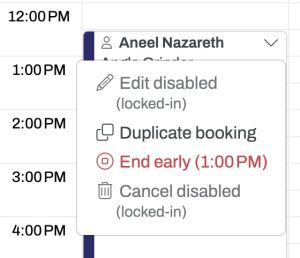
- Don’t let time go to waste. There is a two hour grace period at the beginning of a booking. If the booker is not present after two hours and the printer is still idle, another member may claim the remainder of the time on a first-come, first-served basis. Email 3dprinters@asmbly.org to let us know that this happened. There is a 30 minute grace period after the completion of a print. If the booker is not present and the printer is idle, another member may claim the remainder of the time on a first-come, first-served basis. Email 3dprinters@asmbly.org to let us know that this happened.

Etiquette
If you come in for your scheduled time and a print has finished, feel free to move it and any filament on the machine to the table to the left of the enclosure.
If you are in the 3D printing area and see a print in progress that is obviously failing, it is a good idea to stop the print so that it stops wasting filament. Try to contact the person who has that printer booked in Skedda to let them know. Discourse is a good way to do that, if you don't already know them.
You may find a cut-off piece of filament still in the nozzle when you arrive. This is because the nozzle was cold when the previous user retrieved their filament and they didn't want to wait for it to heat up again. When you heat the nozzle for your own print, just unload the stub and discard it.
Use Case
The Method X has a heated chamber and the ability to anneal prints after they are complete. This makes it a good choice for engineering filaments that require consistent temperature.
Use Skedda to reserve time on the specific printer.
Materials
Acceptable Materials
Many types of 1.75mm filament will work with this printers using the "Labs" nozzle. However the spool size is unusual, so you may need to transfer your filament to a MakerBot spool or feed the filamend externally.
Material Limits
Print volume is smaller that some of our other printers, particularly if you are using both extruders.
Consumables
You are responsible for providing your own filament. Please write your name on your filament spools. There are sharpies available in the tool caddy.
There are many places to order from, including MatterHackers, Prusa, Polymaker, and Amazon.
There are some SD cards in the tool caddy, but if you find yourself printing from SD frequently, consider bringing your own. Files on the Asmbly SD cards are erased periodically to ensure there is enough space for everyone to use.
Operation
Controls
Filament
Make sure that your gcode is sliced for the particular kind of filament you're using. You can select the filament type on the control panel, and adjust the bed and nozzle temperatures.
Extruders
We have a variety of extruders available. If you are printing with non-Ultimaker/MakerBot branded filament, you will probably need to use the Labs "Experimental" Extruder.
Cleanup
Universal Cleaning Guide
- Return the equipment to neutral.
- Sweep up any dust and debris around the tool, your table top, and the floor - both in the equipment area and your work area.
- Clear the floor of any tripping hazards, like power cords.
- Empty trash cans and dust collectors that are halfway full or more into the Asmbly dumpster behind the workshop.
- Leave the shop 110% better than you found it.
Tool Specific Cleaning Guide
- Remove any scraps of filament from the enclosure
- Return any tools you used to the tool caddy
- Make sure the steel sheet you used is clear of any leftover filament
Resources
Manual
Troubleshooting
Please edit this section as you find and resolve problems!